Running a business means receipts, invoices, supplier docs, and all the paper trails that come with it. stub gives you a place to keep them all - and two dead-simple ways to get them there.
No folders on your desktop. No WhatsApp screenshots you'll never find again. Just everything in one place, inside stub.
Where your files live
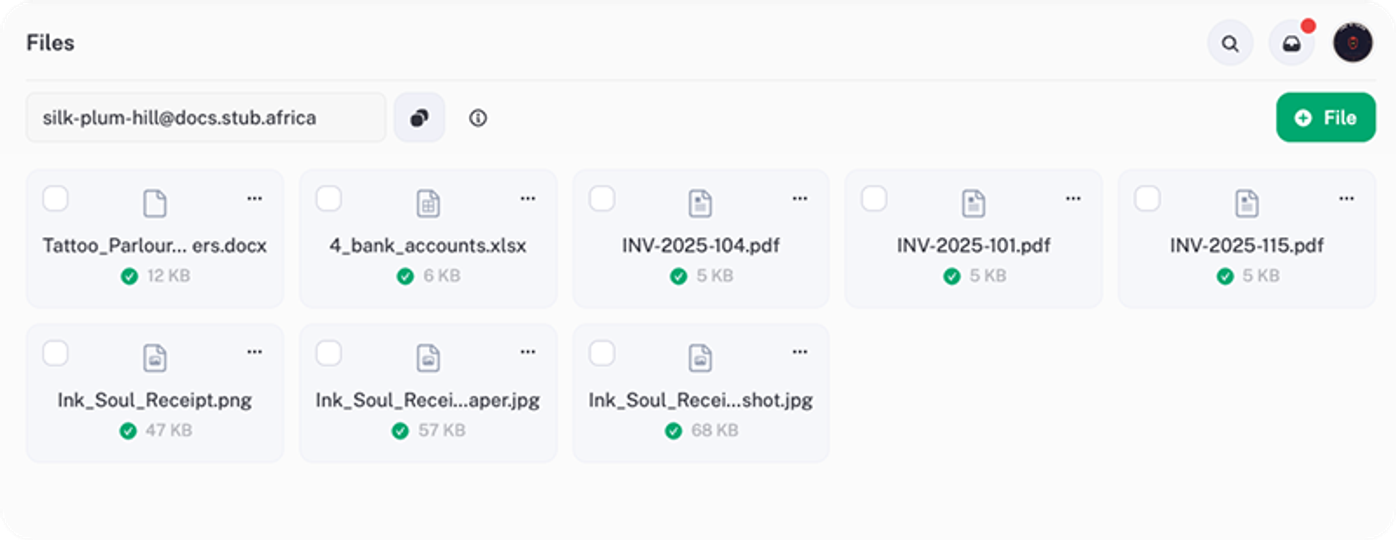
Go to Files in the left-hand menu. That's your document hub - every receipt, invoice, or supplier doc you send to stub ends up here. Here's what it looks like:
Option 1: Email it in
Every stub business gets a unique email address. You'll find it at the top of the Files page - it looks something like:
your-unique-name@docs.stub.africa
Forward invoices, receipts, or supplier docs to that address and they'll land straight in your stub Files. No uploading, no dragging and dropping - just forward and done.
Works great for:
- Supplier invoices that land in your inbox
- Receipts from online purchases
- Statements or docs your accountant sends you
- Anything you'd normally save "somewhere" and forget about
Tip: Save your stub email as a contact on your phone so it's always one tap away. Next time you get a receipt in your inbox, just forward it - sorted.
Option 2: Upload directly
Already got the file on your phone or laptop? You can also upload it straight into Files:
- Go to Files in the left-hand menu.
- Tap the upload area or drag your file in.
- Done. It's in stub.
This works for PDFs, images, and other common document types.
Why bother?
Your files aren't just sitting there collecting digital dust. Having your docs in stub means:
- Everything's in one place when tax season rolls around
- Your accountant (or future you) can find what they need without digging through emails
- You're building a proper paper trail - SARS-friendly and stress-free
FAQ
What file types can I upload? PDFs are the most common, but stub handles the usual suspects - images, documents, and more.
Is there a file size limit? Keep it reasonable. Standard invoices and receipts will upload without any issues.
Can my team see the files too? Yes - if you've added team members, they'll have access to your Files section too. (See How to add team members for setup.)
Can I delete files? Yep. Tap the three dots (⋯) on any file to see your options.
What happens if I email the wrong document? No stress - just delete it from Files and carry on. Nothing else in stub is affected.